
Image to Flux Prompt Generator
Upload an image and get a natural-language Flux prompt in about 5 seconds — 30–80 words in the prose style the T5 encoder actually wants. No tags, no weight syntax, no --ar. Works with Flux 1.1 Pro, Flux Dev, and Schnell. Two free runs a day, no signup.
Drop an image here to generate a Flux prompt
Max 5MB · PNG, JPG, WEBP · takes about 5 seconds
Why Flux prompts are completely different
Flux was architected around the T5 text encoder, which understands full sentences the way GPT-4 does. This is why Midjourney and SDXL habits actively hurt Flux output. The tool below generates prompts in Flux's native 3-part structure: subject & scene → photographic detail → mood & style.
1. Subject & scene (first sentence)
A woman in a red silk dress standing barefoot on a sandy beach at sunsetFlux weights earlier tokens heavily. Lead with who, what, where in one coherent sentence.
2. Photographic specifics
shot on Hasselblad X2D, 85mm lens, shallow depth of field, soft bokeh across the waterFlux's T5 encoder recognizes real camera/lens names and applies their aesthetic signatures — sensor size, dynamic range, color science.
3. Light interaction (not conditions)
warm golden sunset light streaming low across the scene, casting long shadows, dust particles visible in the beamInstead of 'golden hour', describe what the light *does*. Direction, quality, interaction with surfaces — this is where Flux outperforms everything else.
4. Mood / style (optional closer)
cinematic, moody, editorial fashion photographyAdd context flags at the END — Flux uses them as style anchors after the scene is set. Putting them first wastes attention on abstraction.
5. What NOT to include
No --ar 16:9. No (beautiful:1.4). No 8k, masterpiece, best quality tags. No negative prompt.All of these are Midjourney/SDXL syntax. Flux ignores them at best, prints them as literal text at worst (especially Flux Dev with --flags).
Real image, real prompt
The prompt below is the raw output of this tool on the image shown — not hand-written samples.
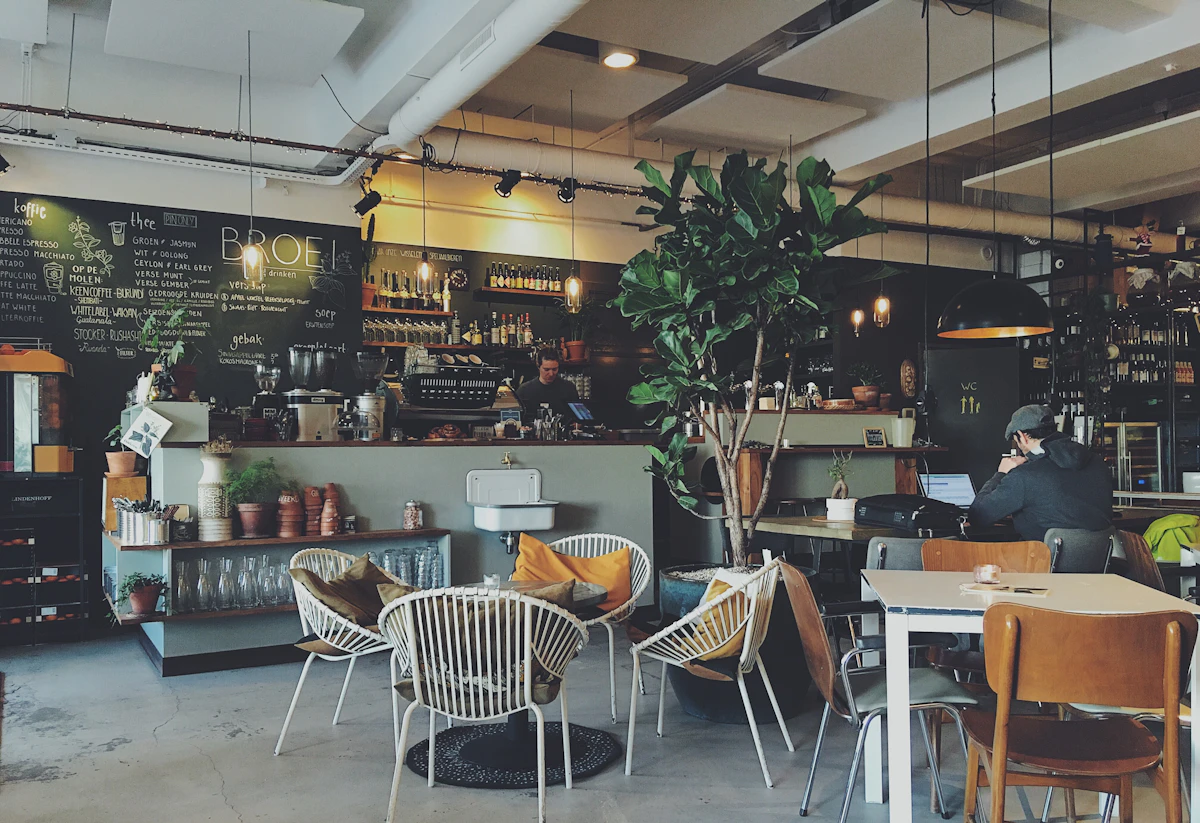
A man with dark hair wearing a cap, facing away, sitting at a table, looking at a laptop screen. Cafe interior: gray concrete floor, white walls, black chalkboard menu with white text, wooden bar with bottles, white chairs with orange pillows, large green potted plant, hanging pendant lights, other patrons in the background. Soft diffused light, warm color temperature, shadows are soft.Things most beginners miss
1. Treat Flux like you're briefing a photographer
Write prompts as if you're describing the shot you want to a human with a camera. Tell them the subject, the setting, the light, the feel. This maps directly to how Flux's T5 encoder processes your input.
2. Real camera names unlock real aesthetics
'shot on Hasselblad X2D' produces different output than 'shot on iPhone 15 Pro' — Flux knows these sensors' color science. Specific gear > generic 'professional camera'.
3. No negative prompts — describe positively instead
Flux Dev/Schnell doesn't support negative prompts. If you want a clean background, don't negative-prompt 'cluttered'; write 'minimal, empty background' in the positive prompt.
4. Flux Dev hates 'white background'
A known Flux Dev quirk: plain 'white background' produces flat, unclear outputs. Add environment detail instead: 'seamless studio backdrop under soft key light' or 'pure white cyclorama'. Flux Pro/Schnell don't have this issue.
5. Guidance 3.0–3.8 for Flux Dev, default for Pro
If you're running Flux Dev locally: steps 24–32, guidance 3.0–3.8, resolution 768–1024. Flux 1.1 Pro's API handles these automatically — you only pass width/height and optional seed.
Flux vs other image models
| Capability | Flux | Midjourney | SDXL |
|---|---|---|---|
| Prompt style | Natural language (prose) | Sentence + --flags | Sentence + tags + negative |
| Text rendering | ✅ Best in class | ✅ Good | ⚠️ Improving |
| Runs locally | ✅ Dev (12GB+) / Schnell | ✅ 8GB+ | ❌ Cloud only |
| Negative prompts | ❌ Not supported | ✅ Full | ❌ Not supported |
Frequently asked questions
What's the difference between Flux 1.1 Pro, Dev, and Schnell?
Pro is API-only (cloud) with Ultra and Raw modes, fastest, best quality, tolerates simpler prompts. Dev is open-weight (non-commercial license), needs 12GB+ VRAM, requires detailed prompts. Schnell is a 4-step distilled version of Dev, open-weight (Apache 2.0), great for iteration. All three use the same prompt style (natural language, no tags).
Why doesn't the output include --ar 16:9 like Midjourney?
Because Flux doesn't use Midjourney flags. Pass width and height as separate API parameters (for Pro) or ComfyUI node settings (for Dev/Schnell). --ar in the prompt text will appear as literal characters in the generated image.
Can Flux generate text correctly in images?
Yes — this is Flux's strongest differentiator vs Midjourney and SDXL. To get clean text, describe it in quotes in natural language: 'a sign reading "OPEN" in red neon letters'. Flux 1.1 Pro handles up to ~10-word text blocks cleanly; Flux Dev is slightly worse.
What's the prompt length sweet spot?
30–80 words. Under 30 words leaves Flux guessing and it fills in average interpretations. Over 100 words starts to dilute the important early tokens (Flux weights earlier words more heavily). The tool targets ~60 words by default.
Do I need a negative prompt for Flux?
No. Flux Dev and Schnell don't support negative prompts. Flux 1.1 Pro's API has a nascent negative prompt field but it's not well-documented and most practitioners don't use it. Describe what you want positively instead.
Flux Pro vs Flux Dev — which prompt approach?
Same structure (natural language, 30–80 words, subject first), but Dev punishes sloppy prompting much more. Pro tolerates shorter, simpler prompts; Dev needs all three parts (subject & scene, photographic detail, light & mood) to produce its best output.
Other model guides
- Image to Midjourney Prompt— Prefer stylized aesthetics over photorealism, or want --sref for style consistency? Midjourney V7 is still the style king.
- Image to SDXL Prompt— Want to run locally on 8GB VRAM (not 12GB+)? SDXL is the practical open-weights choice below Flux Dev's hardware requirements.
Ready to generate your Flux prompt? Open the workspace and drop an image — first two runs each day are free.